
What Should a Service Business Automate First?
The boring workflow usually returns more than the clever one. Here's the order we'd automate a service business in, from first reply to review request, plus the parts that should stay with a person.
Automate the tasks that happen most often and cost the most when someone forgets: the first reply to a new inquiry, appointment confirmations and reminders, quote follow-up, copying data between tools, and the review request after a job. Start with one, give it a human fallback, get consent for texts and emails, and measure it before adding the next. Keep pricing decisions, complaints and anything unusual with a person.
- Start with whatever your team does more than five times a week
- One workflow at a time, with a human fallback
- Build consent, STOP handling and quiet hours in from day one
Automation projects tend to start in the wrong place: a chatbot, an AI assistant, something that demos well. The work that pays back first is usually duller. It's the message that should have gone out on Sunday night, the reminder nobody sent, the quote nobody chased.
Our rule for where to start is plain: whatever you or your team do more than five times a week. That's almost always where the hours are, and where things slip when the week gets busy. If the problem is sheer volume of handoffs, see also Too much manual work? on Solutions.
How do you decide what to automate first?
Score each repeated task on three questions:
- How often does it happen? Daily beats monthly.
- What does it cost when it's missed? A lost inquiry or a no-show costs more than a late internal note.
- Is it predictable? If the right action is the same 9 times out of 10, it can be automated with a person handling the 10th.
High on all three goes first. Here's the order that usually comes out for a service business.
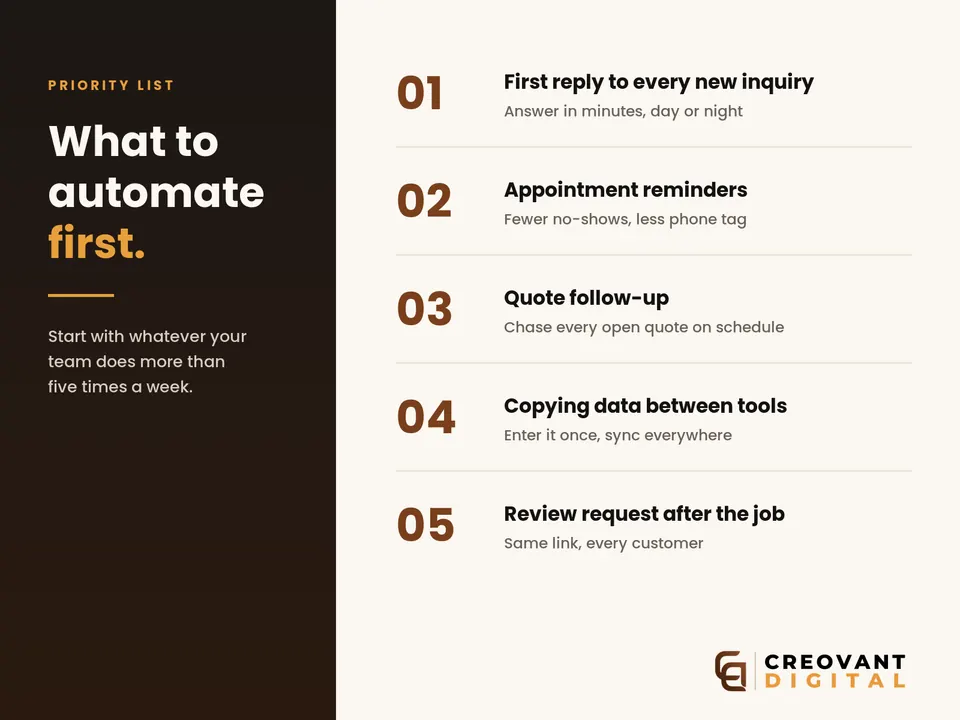
1. The first reply to every new inquiry
Why first: it happens every day, and a slow reply can lose the job. An inquiry that arrives on Sunday night and gets answered on Tuesday is often already somebody else's customer. We cover the reasoning in The first five minutes decide whether you win the job.
What it looks like: a form, call or message triggers an immediate, specific reply, for example confirming the service area and sending a booking link, and the lead is logged with its source. A person follows up during working hours.
Keep human: pricing that depends on a site visit, and anything the customer asks that isn't on the standard list.
2. Appointment confirmations and reminders
Why second: no-shows cost a slot you can't resell at short notice, and reminders are one of the few automations with solid outside evidence. A Cochrane systematic review of randomized trials in healthcare found that text-message reminders improved appointment attendance compared with no reminders, and worked about as well as phone-call reminders at lower cost. The authors rated the evidence low to moderate quality (Cochrane, Gurol-Urganci et al., 2013). That was healthcare, not home services, so treat it as a strong hint rather than a promise for your business.
What it looks like: a confirmation when the booking is made, a reminder the day before, and a one-tap way to reschedule instead of silently not turning up. Often delivered through Email & SMS Marketing.
Keep human: last-minute changes that affect a crew's whole day.
3. Quote follow-up
Why third: a quote that goes out with no follow-up often just goes quiet. The second, third and fourth touch are the ones nobody has time to send by hand.
What it looks like: a short sequence after a quote is sent, spaced over about a week and a half, that answers the common objection (price, timing, disruption) and ends with a clear, polite last message. It stops the moment the customer replies or books.
Keep human: negotiation and discounts. Automation can draft them for approval; it shouldn't send them.
4. Copying data between tools
Why fourth: it doesn't lose customers directly, but it eats hours and creates errors. Contacts typed into the CRM, then the invoicing tool, then the job calendar.
What it looks like: a record created once, then synced to every tool that needs it, with an alert if a sync fails — typically where Business Growth Systems and AI Automation meet.
Keep human: cleanup of duplicates and merges where the system isn't sure two records are the same person.
5. The review request after the job
Why fifth: it's frequent and predictable, and it's the step most businesses forget. A job marked complete triggers one message with your official Google review link, sent to every customer. Our guide to getting more Google reviews without breaking the rules covers what Google allows. In short: no incentives, and no sending the link only to customers you expect to be happy.
What rules apply to automated texts and emails?
Automation sends more messages, more reliably, so it needs the rules built in from day one. A summary, not legal advice:
- US texts: the FCC says automated texts to mobile numbers need the recipient's prior consent; commercial texts generally require written consent, while informational texts such as reminders may only need oral consent (FCC: Stop unwanted robocalls and texts). Under FCC rules adopted in 2024, people can revoke consent in any reasonable way, opt-outs must be honored within 10 business days, and you may send one confirmation text after an opt-out. US business texting through carriers also generally requires registration (A2P 10DLC) before sending.
- Email to Gmail users: Google requires all senders to authenticate with SPF or DKIM, among other things, and requires marketing and subscribed messages to support one-click unsubscribe and show a visible unsubscribe link (Google: Email sender guidelines).
- Philippines: the Data Privacy Act of 2012 defines consent as a freely given, specific, informed indication of will, evidenced by written, electronic or recorded means (National Privacy Commission: Data Privacy Act). Collect it on the form that feeds the list.
Practical version: clear opt-in wording on every form, STOP handling that actually works, quiet hours, and a frequency cap.
What should you not automate?
- Anything involving money decisions: discounts, refunds, custom quotes. Draft for approval.
- Complaints and sensitive conversations. Route them to a person fast; don't let a bot argue.
- Pretending to be human. If a customer is talking to an automated assistant, don't tell them otherwise.
- Anything without a fallback. If a workflow can't handle a message, it should hand it to a person, not guess.
How do you know it's working?
Before you switch anything on, write down one number for the workflow, such as the average time to first reply, the no-show rate, or the share of quotes followed up. Check it again after a month. Change one workflow at a time so you can tell what made the difference.
Common questions
Do I need AI for this?
How long does a first workflow take?
Will automation replace my staff?
Pick the task your team repeats most and forgets most
That's your first workflow. On a mapping call we'll say which one we'd build first and what it costs from published pricing. A single workflow starts at $400 / ₱8,000. Every workflow we build has a way to hand off to a person.