
How to Get More Google Reviews Without Breaking the Rules
Most businesses don't lack happy customers. They lack a habit of asking. Here's how to ask every customer at the right moment, what Google and the FTC prohibit, and why “only ask the happy ones” breaks the rules.
To get more Google reviews, ask every customer, soon after the job, using the official review link from your Google Business Profile, and make it one tap. Don't offer anything in return, don't ask only the customers you expect to be happy, and reply to the reviews you get, good and bad. Google says more reviews and positive ratings can help local ranking. Rule-breaking shortcuts can get reviews removed or your profile restricted.
- Same official link for everyone — not a gated “happy path”
- Ask the day the job is done; one reminder, then stop
- No incentives, no “leave 5 stars”, no staff quotas
Most service businesses don't lack satisfied customers. They lack a consistent habit of asking. The job ends, everyone's busy, and the moment passes. This guide covers what the rules allow, when and how to ask, and how to turn it into a routine that runs without anyone remembering.
Why do Google reviews matter for a local service business?
They affect both whether people find you and whether they choose you. Google says local results are based mainly on relevance, distance and prominence. Prominence is partly based on information like how many websites link to your business and how many reviews you have, and Google states that “more reviews and positive ratings can help your business's local ranking” (Google: Tips to improve your local ranking). Google also notes that there is no way to request or pay for a better local ranking.
Reviews appear next to your Business Profile in Maps and Search. For a customer comparing three plumbers, they're often the first proof they read. For how local presence fits next to classic search and assistant answers, see Getting found when people ask an assistant instead of searching.
What does Google prohibit when you ask for reviews?
Google's Maps content policy is specific. Merchants may not (Google: Prohibited & restricted content):
- Offer incentives such as payment, discounts, or free goods or services in exchange for a review, or for changing or removing a negative one.
- Discourage or prohibit negative reviews, or selectively solicit positive reviews from customers.
- Pressure customers to leave a review while on the premises, or ask them to include specific content, including a staff member's name.
- Set staff quotas for a certain number of reviews.
- Post reviews based on a conflict of interest, such as from employees, family, or competitors.
What Google does allow: asking customers to post reviews that reflect a genuine experience, without offering incentives or attempting to influence the rating or the contents of the review.
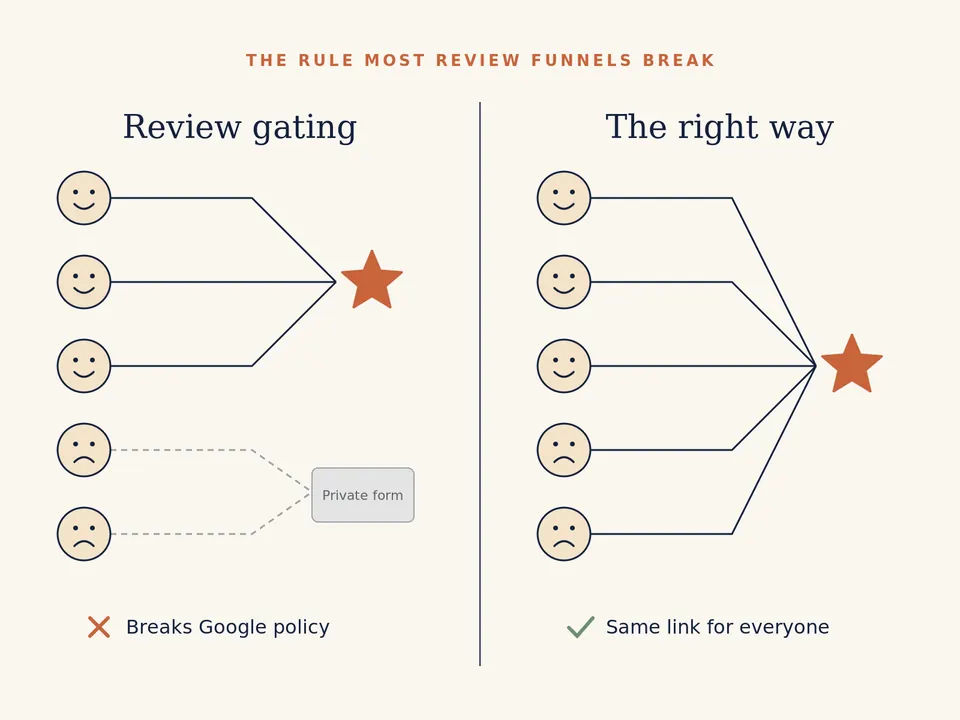
The rule most “review funnels” break
A common setup sends a “How did we do?” message first, then sends happy customers to Google and unhappy ones to a private form. Google's policy says merchants may not “selectively solicit positive reviews”. Asking for private feedback is fine. Deciding who gets the Google link based on their answer is the problem. The safe version is simple: everyone gets the same review link. You can still offer a direct line to fix a problem, as long as it's offered to everyone and doesn't replace the review link.
What do US rules add?
If you serve US customers, the FTC's rule on consumer reviews and testimonials (16 CFR Part 465, effective October 21, 2024) prohibits, among other things (eCFR: 16 CFR Part 465):
- Writing, buying or selling fake reviews, including reviews by people who don't exist or didn't use the service.
- Offering compensation or incentives conditioned on a positive or negative sentiment.
- Certain undisclosed insider reviews from officers, managers, employees or their relatives.
- Review suppression through groundless legal threats, intimidation or false accusations.
Google's policy is stricter than the FTC's on incentives: Google bans incentives for Google reviews outright. If in doubt, follow Google's rule. This is a summary, not legal advice. Check rules for the market you operate in.
How do you find your official review link?
Use the link Google generates, not one you've built yourself. In your Business Profile, select Read reviews, then Get more reviews. You can copy the link or download a QR code (Google notes QR codes can currently only be generated from a computer browser) (Google: Create a link or QR code to request reviews). Google suggests sharing it on receipts, in thank-you emails, at the end of a chat, or as a printed QR code.
One practical detail: customers need to be signed in to a Google Account to leave a review, and they can create one with a non-Gmail address.
When should you ask?
Ask when the job is finished and the result is visible: the clean is done, the leak is fixed, the event is over. Waiting weeks lowers the chance that people remember or care. A simple pattern:
| When | Channel | What it says |
|---|---|---|
| At handover, in person | Spoken, plus a QR card | “If you have a minute later, a Google review really helps us.” (No pressure to do it on the spot.) |
| Same day or next day | SMS or WhatsApp | One sentence, the official link, your business name |
| 3–5 days later, only if no review yet | A short reminder with the same link, then stop |
Two messages at most. After that, it becomes pestering.
What should the message say?
Short, specific to the job, no conditions. For example:
Hi Ana, thanks for having us at the Maple St. apartment today. If you have a minute, a Google review helps other people find us: [review link]. — Josh, Northside Cleaning
The example names are placeholders, not a real customer or business.
What to avoid:
- “Leave us 5 stars!” (asks for a specific rating)
- “Mention Josh in your review!” (asks for specific content)
- “Review us and get 10% off your next clean” (incentive)
- Sending the link only to customers who said they were happy
Should you reply to reviews?
Yes, all of them where you can. Google lists replying to reviews among its tips for local ranking and says positive reviews and helpful replies can help a business stand out. Google also says a mix of positive and negative feedback often feels more trustworthy.
For a negative review: thank them, acknowledge the specific problem, say what you've done or offer a direct contact, and keep it short. Never threaten, never reveal the customer's private details, and never offer anything in exchange for removing it.
How do you make asking automatic?
The habit breaks when it depends on someone remembering at 6pm. The fix is a trigger: when a job is marked complete in your booking tool or CRM, the review request goes out on schedule, to everyone, with a stop rule once a review is left or after the second message.
What you need:
- A place where “job complete” is recorded (booking system, CRM, job management tool) — often where Business Growth Systems sit.
- The customer's consent to be contacted on that channel. For the broader “what to automate first” framing, see What should a service business automate first?.
- The official review link, saved once.
- A short, compliant message for each channel.
If you also want private feedback, send it as a separate, optional question to everyone, not as a filter in front of the review link.
What not to expect
- Not every request becomes a review. Many people won't respond, and that's normal.
- Reviews aren't a ranking switch. They're one part of prominence, alongside relevance and distance, which you only partly control.
- Removed reviews happen. Google removes content it judges fake or policy-violating, and it can restrict profiles for violations.
Common questions
Can I offer a discount or entry into a prize draw for a Google review?
Can I ask only my happiest customers?
Can my employees or relatives review the business?
Ready to ask every customer, the same way?
Creovant Digital builds review requests as part of Email & SMS Marketing, triggered from your own booking or CRM records and sent from accounts you own. We can't promise a number of reviews or a ranking; we can make sure nobody gets forgotten.